
 Tiếng Việt
 한국어
 日本語
Article
Too Much Stuff As A Freelancer? How To Organise Your Home Workspace
On this page
Organising a home workspace as a freelancer takes a clear split between the work area and the living area, regular decluttering by how often each item is used, and vertical storage such as wall shelves, pegboards and mobile drawer units. When the amount of tech equipment, project documents and personal belongings outgrows a small apartment, adding an outside self-storage unit is the best way for a freelancer to win back living space and raise creative productivity. Items you rarely use can move into a self-storage service once you have decluttered using popular decluttering and storage methods.
1. Why Freelancers Get Overloaded With Belongings
Freelancers who work from home often find their living space taken over by dozens of tech devices, project documents and personal items mixed together. Because the job combines several roles in one room of fixed size, the gear that piles up with every client contract quickly turns the workspace into a cluttered dumping ground, seriously hurting concentration.
The Wide Range Of Belongings Freelancers Accumulate
Building an independent career keeps adding specialised items for projects:
- Core tech hardware: High-spec laptops, secondary graphics monitors, mechanical keyboards, ergonomic mice, noise-cancelling headphones, webcams and a growing pile of portable drives holding backups.
- Profession-specific gear: Digital cameras, camera lenses, tripods, softbox lights, drawing tablets and professional recording microphones.
- Documents and transaction records: Signed service contracts, acceptance reports, tax invoices, idea notebooks and specialist books collected over many years.
- Personal items and living supplies mixed in: House clothes, coffee mugs, snacks, supplements and workout gear left within reach of the computer desk.
- Old accessories and spares: Old charging cables, universal chargers, power banks, tech product boxes kept for warranty and spare computer parts.
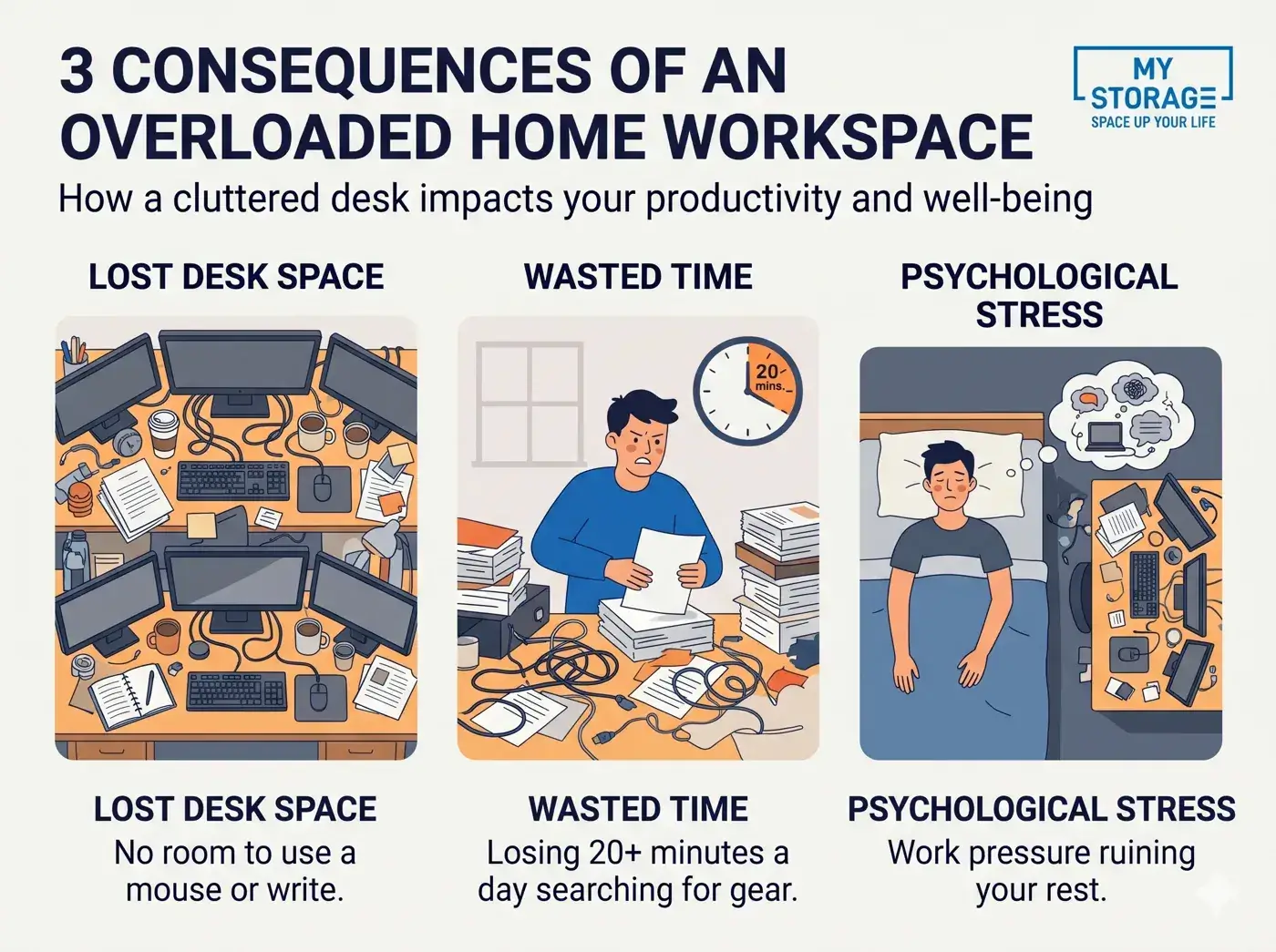
Consequences Of An Overloaded Freelancer Workspace
A cramped, messy working environment directly harms work performance and mental health:
- A desk squeezed out of space: Room for the mouse and for writing shrinks sharply as monitors, cables and cups take up to 80% of the desk surface.
- Time wasted hunting for gear: Every time you need an HDMI adapter, a camera memory card or an old contract, you dig through drawers and lose around 20 minutes a day on average.
- Psychological conflict between work and rest: A desk right next to the bed blurs the boundary between work time and rest; you always feel work is unfinished even while lying down.
- Tangled power cables and fire risk: Dozens of power plugs sharing one extension board under the desk tangle easily, collect dust and risk a dangerous short circuit.
Signs Your Workspace Needs Reorganising
Spotting the warning signs below early lets you overhaul your workspace before you reach burnout:
- No space left for basic activities: You cannot open an A4 notebook to write without pushing the keyboard aside or moving a cup.
- Devices covered in dust for months: Many tech accessories, lights or reference books have sat untouched in a corner for more than 6 months.
- Things that must keep moving: Every time you eat or go to bed, you carry a pile of papers from the bed to the desk or back.
- A suffocating feeling every morning: You sit down at the desk feeling discouraged and uninspired just from seeing the tangle of cables and documents.
In a small home, you can start with creating a tidy workspace with smart storage for a small home before thinking about renting extra space.
2. Decluttering And Sorting A Freelancer’s Belongings
Decluttering thoroughly is the essential step before you buy any more cabinets, shelves or storage boxes. By sorting items by how often they are really used and applying the 4-box method, a freelancer can remove 30% to 50% of surplus items, clearing space for the workspace.
Sorting Belongings By How Often You Use Them
Grouping assets by weekly use tells you exactly where each item should sit within reach:
- Group 1 - Daily Essentials: Laptop, main monitor, mouse and keyboard, work notebook and water cup; they must sit within a 40 cm reach.
- Group 2 - Weekly Tools: Backup drives, recording microphone, monitoring headphones, active project documents; keep them in a desk drawer or on the wall shelf next to you.
- Group 3 - Project-based Gear: Cameras, lenses, video lights, product photography props; keep them in a dry cabinet or a dedicated storage box.
- Group 4 - Rarely Used: Contracts from past years already settled, spare old computer equipment, packaging cartons; move them into a separate storage unit away from the desk area.
Applying The 4-Box Method To Declutter
The 4-box action method helps freelancers make firm decluttering decisions in a single session:
- Box 1 - Keep: All hardware that works reliably and project documents that directly earn revenue this month.
- Box 2 - Sell/Donate: Old computer monitors already upgraded, mechanical keyboards you do not use, specialist books you have finished; pass them on to recover capital or help friends.
- Box 3 - Trash: Cables broken inside, headphones dead on one side, faded paper invoices, empty pens and torn foam packaging.
- Box 4 - Offsite Storage: All tax records that must be kept for 5 to 10 years by law, bulky event equipment waiting for a big project; move them into a self-storage unit.
If you want to fit the whole process into one session, follow the 30-minute checklist for tidying and organising stored items at the weekend, then move the rarely used items into outside storage boxes.
Checking Devices And Documents Before Decluttering
A technical review of old electronics and paper documents helps prevent security risks and damage to your assets:
- Check lithium battery condition: Remove batteries from cameras, wireless mice and microphones if unused for a long time, to prevent swelling and acid leaks that destroy the circuits.
- Sort connection cables by standard: Group charging cables by port (Type-C, Lightning, Micro-USB, HDMI) and discard flaky cables that overheat devices.
- Fully digitise payment records: Use a phone scanning app to scan all VAT invoices and collaborator contracts into PDF files stored in the cloud; shred scrap paper containing customers’ personal information.
Invoices and tax records usually have to be kept for years, so learn the record and document storage periods for businesses to know which papers can be destroyed and which should go into storage.
Freelancer Decluttering Checklist Table
This review table of 5 main item groups helps freelancers judge the value of each item objectively before decluttering:
| Item Group | What To Review | Best Way To Handle It |
|---|---|---|
| Electronics | Old laptops, secondary monitors, rarely used tablets | Test them: sell or repurpose as a second monitor |
| Cables and chargers | Surplus connection cables, multi-port chargers, adapters | Group by standard, dispose of cables with duplicate functions |
| Paper records | Old contracts, expense invoices, project notebooks | Digitise to PDF on Google Drive, shred drafts |
| Specialist books | Old software manuals, design magazines | Donate to a community library, keep your favourite reference books |
| Personal items | Spare cups, snacks, clothes draped on chairs | Return them to the kitchen and wardrobe, clear the desk |
3. How To Zone A Home Workspace
Setting clear functional boundaries between the concentration zone, the equipment storage space and the rest area is the make-or-break secret for freelancers working at home. Even in a small bedroom or a narrow studio, creating separate visual boundaries helps the brain switch working states effectively and switch off work pressure when the day ends.
The Main Home Work Zone
The central desk area should be a sacred space reserved only for deep focus:
- Minimalist desk rule: The desk surface holds only the computer, mouse and keyboard, one daily work notebook and one drinking cup; absolutely no pending documents or snacks.
- Proper ergonomic setup: Place the monitor 50 to 70 cm from your eyes with its top edge at eye level; adjust the chair so thighs are parallel to the floor and feet rest flat.
- Welcome natural light: Place the desk at a right angle to the window to use daylight, which reduces eye strain and saves lighting electricity.
Equipment Storage Zone
A dedicated technical storage corner protects expensive tech equipment from knocks and dust:
- Dry cabinet or sealed box with desiccant: Essential for photography and filmmaking freelancers to keep camera bodies and lenses free of fungus during the tropical rainy season.
- Wall-mounted pegboard: Mount a pegboard next to the desk to hang over-ear headphones, cables, a stopwatch and frequently used accessories within reach.
- Mobile drawer unit with ball-bearing slides: Put a 3-drawer unit under the desk to hold portable drives, power banks, a Wacom tablet and a spare mouse.
Document Storage Zone
Keeping work records in order helps freelancers stay professional when reconciling payments with clients:
- Tiered document tray system: Use a 3-tier tray on the desk corner or a low shelf: Tier 1 (files to handle now), Tier 2 (files awaiting client feedback) and Tier 3 (completed files waiting for storage).
- Binders and A4 archive boxes: File business contracts and invoices in labelled lever-arch binders showing the financial year for quick retrieval at tax settlement.
- Locking up important papers: Property papers and clients’ NDA contracts should be kept in a drawer with a mechanical lock or a small safe.
Freelancers with a registered household business can look at how to handle storing accounting vouchers and records so they can arrange binders by financial year.
Separating Living Space From Your Workspace
Setting physical and psychological boundaries between work and personal life is the key to protecting mental health:
- Never take the laptop to bed: The bed is only for rest; working with a computer on the bed ruins sleep quality and strains the neck and spine.
- Use flexible soft dividers: Use a thin fabric curtain, a double-sided open bookshelf or a separate floor rug under the desk to divide a studio apartment.
- A shutdown ritual after work: When the day ends, switch off the computer, push the chair under the desk and draw the curtain over the work corner to signal to your brain that it is time to fully rest.
Workspace Layout By Room Size
Suggested floor-plan options for each type of living space a freelancer may have:
| Type Of Space | Priority Organising Solution | Recommended Furniture |
|---|---|---|
| Dedicated study | Fully separate the work area from the guest area | Height-adjustable desk, floor-to-ceiling filing cabinet, reading sofa |
| Small bedroom | Use a dead corner or the space by the window | Compact L-shaped corner desk, wall shelves, chair with fold-up arms |
| Open studio apartment | Use multifunctional furniture as a symbolic divider | Open-back double-sided bookcase, work desk combined with a kitchen island |
| Shared living room corner | Set up a standalone work station, closed after work | Slim wall-mounted console table, cabinet with doors to hide equipment |
4. 8 Tips For Organising A Freelancer’s Workspace
Applying 8 smart space-organising solutions helps freelancers double their real storage space without enlarging the room. From using tall wall space and hiding power cables to adopting fold-away furniture, your workspace will always stay minimalist, modern and full of inspiration.
Use Vertical Wall Space
The wall space above the desk is a storage gold mine that is often wasted:
- Install floating wall shelves: Mount 2 or 3 wooden shelves 20 to 25 cm deep on the wall for specialist books, project documents and small air-purifying plants.
- Use a metal pegboard system: Hang all computer accessories, scissors, pens, headphones and a clock on the pegboard; free up 100% of the desk surface.
- Magnetic or cork notice boards: Use them to pin weekly project schedules and moodboard sketches instead of sticking messy notes around the monitor frame.
Use Multifunctional Cabinets And Shelves
Choose multifunctional furniture that can transform to suit real needs:
- Desk with built-in bookshelves: A desk frame with built-in shelf compartments for books and documents makes full use of the desk footprint without taking more floor space.
- Storage cabinet with closed doors: Hide accessory boxes, a mini printer and documents inside a cabinet with doors for a flat, clean visual effect in the room.
- Mobile shelf with locking wheels: Easily roll the camera equipment cart out to the shooting spot and push it back into the wall corner after the session.
When choosing a cabinet for your workspace, each of the types of home storage cabinets suits a different group of equipment.
Optimise The Space Under The Desk
Using the space beneath the desk smartly keeps your legs comfortable:
- Add a mobile drawer unit: Put a tidy 3-drawer unit beside one desk leg to hold all stationery, chargers and personal notebooks.
- Fit a headphone hook under the desktop: Stick a 360-degree rotating headphone hook under the desktop to hang over-ear headphones neatly when not in use.
- Keep leg room clear: Never pile cartons or random items under the desk, so you can stretch your legs out and keep blood circulating well.
Hide And Manage Power Cables
Hidden wiring is the dividing line between a messy corner and a professional work station:
- Install a cable tray under the desk: Fix a metal mesh tray under the desk so the extension board, laptop charger and monitor power cable all sit inside it.
- Use spiral cable sleeves or hook-and-loop ties: Wrap all mouse, keyboard and monitor cables into a single sleeve running straight down to the power tray.
- Silicone clips to hold charging cable ends: Stick silicone clips on the desk edge so the phone charging cable end does not slip to the floor every time you unplug the device.
Use Labelled Storage Boxes
Standardised packing in matching compartment boxes makes managing hundreds of small items easy:
- Clear plastic boxes with tight lids: Let you see the item inside at once without lifting each box down to open and check.
- Handheld label printer: Print a clear title for each box (for example: Camera adapter cables, Project backup drives, Microphone accessories) and stick it on the front.
- Fabric dividers in drawers: Place small divided trays inside the desk drawer to keep memory pens, paper clips, SD cards and earbuds neatly in place.
Digitise All Your Documents
Remove piles of messy paper completely with office digitisation:
- Paperless scanning process: Scan all VAT invoices, tax deduction records and project contracts into PDF files stored on secure cloud platforms such as Google Drive or Dropbox.
- A scientific file-naming standard: Name files with a standard structure: Year_Month_ClientName_DocumentType (for example: 2027_03_CompanyABC_ServiceContract.pdf) to search in 3 seconds from the search bar.
- Use electronic signatures: Sign contracts remotely with a digital or legal electronic signature, removing the need to print and store paper contracts at home.
Use Smart Folding Furniture
A lifesaving solution for freelancers living in tiny rooms under 15 square metres:
- Wall-mounted folding desk: When you are not working, fold the desktop flat against the wall like a picture, returning 100% of the floor area to family life.
- Ergonomic chair with arms that fold 90 degrees: Easily slide the chair under the desk at the end of the workday so the walkway in the room stays roomy.
- Smart height-adjustable coffee table: Placed in the living room, it can be raised to 75 cm to turn into a laptop work desk in a flash.
The One Item, One Place Rule
Training the discipline of keeping things in order is the key to keeping the room from becoming cluttered again:
- Every item has a fixed address: Pens go in the pen tray, the camera stays in the dry cabinet, headphones hang on a pegboard hook; never leave things anywhere on impulse.
- Return things in 3 seconds: Right after using any item, spend 3 seconds putting it back in its assigned place.
- A 5-minute end-of-day desk reset: Spend 5 minutes before bed to put away the notebook, wash the coffee cup and wipe the desk clean with a damp microfibre cloth to welcome the new day full of energy.
5. Freelancer Workspaces By Profession And Storage Prices 2027
Each freelance field has its own kind of gear and technical storage needs. When the scale of work outgrows what the home can hold, adding outside self-storage is a strategic economic move in 2027 to protect your professional assets in full.
For Freelance Designers
The workspace of a graphic designer or UI/UX designer demands precise colour accuracy and minimalism:
- Colour-accurate monitor setup: The desk needs a depth of at least 60 to 70 cm to hold a 27-inch professional graphics monitor with a monitor arm, freeing the desktop for a Wacom drawing tablet.
- A place for tablets and styluses: Fit a soft velvet-lined tray in the desk drawer for the Wacom stylus, spare nibs and a one-handed specialist keyboard.
- Storing reference materials and samples: Dedicate one wall shelf to Pantone colour books, brand design documents and print material samples.
For Freelance Videographers And Photographers
Freelance video makers and photographers own the bulkiest and most expensive equipment among independent workers:
- Invest in a dedicated dry cabinet: Fit an electronic dry cabinet of 50 to 100 litres next to the desk to keep humidity below 50%, protecting lenses and camera bodies from fungus.
- A U-shaped stand for tripods and lights: Set aside a room corner with a hanging rack or upright fabric bin for camera tripods, light stands, C-stands and folded reflectors.
- Shockproof cases for batteries and memory cards: Sort all camera batteries, dual chargers, card readers and high-speed memory cards into a shockproof plastic case lined with die-cut foam.
For Freelance Writers
Copywriters, content creators and translators need a completely quiet workspace with an uncluttered desktop:
- A Zen-style minimalist desk: Keep only a laptop, a quiet mechanical keyboard, a small notebook and a scented candle or essential oil diffuser to relax the mind.
- Bookshelves sorted by research topic: Arrange research books, dictionaries and reference documents by topic group on the wall shelf and label the spines for quick citations while writing.
- A reading and sketching corner: Set up a small relaxing armchair by the window with a reading floor lamp to change posture when you need ideas for a new campaign.
For Freelance Programmers And IT Professionals
Developers and remote software engineers need good heat dissipation and the ability to manage many devices at once:
- Multi-monitor setup in portrait and landscape: Use a dual monitor arm to hang one landscape screen for the software interface and one portrait screen to read long code without constant scrolling.
- Cooling tray and network equipment box: Put the network switch hub, wifi router and high-power chargers in a dedicated technical box under the desk for good airflow.
- Compartment boxes for electronic components: For IoT hardware engineers, sort resistors, microcontroller boards and breadboard cables into plastic multi-cell trays with clear lids.
For Freelance Marketers
Marketers, strategy consultants and project managers often hold online meetings with international partners:
- A professional online meeting corner: Put the desk with your back to a tastefully painted wall or a tidy bookshelf; add an LED face light and a 2K webcam.
- Folders to manage each client campaign: Use differently coloured plastic folders to sort contracts, communication plans and KPI reports for each partner brand.
- Active noise-cancelling headset for calls: Hang a headset with a smart noise-filtering microphone on a hook by the desk, ready for video calls with clients at any time.
When Should A Freelancer Rent Outside Storage?
Renting an outside self-storage unit is a smart solution when your room has reached its physical capacity:
- The home has become a gear warehouse: Under the bed, on top of wardrobes and the balcony are all taken up by cartons of equipment, light stands and old documents, making the living space suffocating.
- Equipment used only seasonally or for big projects: High-power studio lights, spare cinema cameras or event props used only 2 to 3 times a year should not crowd your home.
- Accounting records piling up over years: Freelancers with a registered household business or their own company must keep tax records for 5 to 10 years as required by law.
- Moving house or renovating: You need a safe place for an expensive computer setup and gear for a few weeks while waiting for the new room.
If you are torn between the two directions, comparing renting storage versus keeping things at home shows which costs less when gear takes up space long-term; for just a few boxes, a unit from 1 m³ (holds about 8 to 10 medium cartons) is usually enough, following personal mini storage rental by the month.
Self-Storage Price List 2027
Below is the 2027 reference price list for personal and freelancer self-storage units in Ho Chi Minh City:
| Unit Type | Equivalent Volume / Area | Typical Capacity For A Freelancer | Reference Price (VND/Month) |
|---|---|---|---|
| Mini Box | 1 m³ to 3 m³ (about 0.5 - 1.2 m²) | About 8 to 30 boxes (tripod stands, props, project document boxes) | 873,000 VND (≈ US$33.91) to 1,563,000 VND (≈ US$60.71) (1 to 3 m³, standard unit) |
| Standard S | 4 m³ to 8 m³ (about 1.5 - 2.5 m²) | About 32 to 80 boxes (a full set of filming gear, spare furniture, large suitcases) | 1,796,000 VND (≈ US$69.76) to 2,886,000 VND (≈ US$112.10) (5 to 7 m³, standard unit) |
| Business M | 9 m³ to 16 m³ (about 3.5 - 5.5 m²) | About 72 to 160 boxes (suits a group of freelancers sharing an equipment store) | 3,533,000 VND (≈ US$137.24) to 3,905,000 VND (≈ US$151.69) (from 10 m³, standard unit) |
| 24/7 Air-Conditioning Option | Based on the volume rented | Holds 20°C - 24°C continuously (protects cameras and electronics from mould) | About 30% - 40% more than a standard unit |
The prices above are 2027 reference prices for MyStorage self-storage in Ho Chi Minh City, flexible monthly plan, excluding VAT; the 12-month plan is 15% cheaper, and 1 m³ holds about 8 to 10 medium cartons. VND is the billing currency and converted figures move with the exchange rate. Actual cost varies with unit size, location and contract length; the exact price for each size appears as soon as you pick a size in the tool below. The price per m³ falls as units get larger, so when comparing mini storage rental prices in Ho Chi Minh City, include the gear you plan to buy during the year.
Choose the rental type, size and temperature to see today’s MyStorage storage price and book with any available offer:
MyStorage Self-Storage Solutions For Freelancers
A tidy, airy living space is the most precious nourishment for the boundless creativity of independent workers.
Do not let bulky light stands, old boxes of books or spare equipment stifle the breathing space and inspiration of your working days. Decluttering your living space does not mean throwing away valuable work gear; moving rarely used items to a professional outside storage facility is a smart investment decision for a sustainable freelance career.
The MyStorage self-storage facilities in Ho Chi Minh City offer storage for equipment and personal belongings for the freelance community. With private self-managed mini storage units fitted with air conditioning that controls humidity and temperature 24/7, multi-layer security cameras and flexible access with an independent PIN code, MyStorage protects your cameras, computers and documents from mould and dust. In particular, at the 375 Vo Nguyen Giap facility, the integrated model with a comfortable workspace lets freelancers keep their gear safely and also work in a professional, connected environment, returning spaciousness and peace to your home.
6. Frequently Asked Questions
Here are 15 frequently asked questions about organising a home workspace for freelancers:
How do I arrange a home workspace as a freelancer?
Set up the desk and chair to ergonomic standards: the monitor 50 to 70 cm from your eyes with its top edge at eye level, thighs parallel to the floor. Place the desk at a right angle to the window for natural light and keep only the computer, mouse and keyboard, notebook and one cup on the desk; put everything else on wall shelves or in drawers.
How should a freelancer organise a workspace in a small room?
Use the corner with a small L-shaped desk, add floating shelves and a pegboard to use wall height, then put a mobile drawer unit under the desk. This frees the desk and floor without buying a big cabinet; in a room under 15 square metres you can add a wall-mounted folding desk.
Where should a freelancer put the work desk at home?
Put the desk in a quiet corner of the living room or bedroom, next to a window for natural light, and avoid pointing the monitor towards the bed. If you must share the bedroom, use a curtain, an open shelf or a separate rug under the desk to separate the work zone from the rest zone.
What are the tips for keeping a freelancer’s desk tidy?
Keep only the computer, mouse and keyboard, notebook and one cup on the desk. Use a monitor arm, hide the extension board and charger in a cable tray under the desk, and spend 5 minutes at the end of the day putting away the notebook and wiping the desk clean.
How should a freelancer store electronic equipment?
Keep cameras, lenses and moisture-sensitive gear in a dry cabinet or a sealed box with desiccant packs; for rarely used devices, remove lithium batteries to avoid swelling. Group cables by connector standard (Type-C, Lightning, HDMI), coil them with hook-and-loop ties and label each box.
What are the tips for managing cables at a workspace?
Install a cable tray under the desk to hold the extension board and chargers, and run the mouse, keyboard and monitor cables into one spiral sleeve down to the tray. Add silicone clips on the desk edge to hold charging cable ends, so cables do not tangle your feet and collect less dust.
Is it okay to put a work desk in the bedroom?
Yes, if you set clear boundaries: use a soft curtain or open shelf to separate it from the bed, never take the laptop onto the bed, and clear the desk before sleeping. These boundaries help the brain recognise rest time and avoid the feeling of unfinished work while lying down.
How do I separate work from rest when working at home?
Create visual boundaries with a light divider, a curtain or a separate rug under the desk, and never work in bed. At the end of the day, switch off the computer, push the chair under the desk and draw the curtain over the work corner to signal the end of work.
Which shelves suit a small workspace?
Prefer floating wall shelves about 20 to 25 cm deep and metal pegboards to use wall height without taking floor space. If you need room for equipment, add a mobile shelf with locking wheels that can be pushed into a corner after work.
How should a freelancer store documents and records at home?
Sort documents by client into A4 binders, label the spines with the financial year and keep them in a lockable drawer; property papers and NDA contracts belong in a small safe. Tax records that must be kept for years can move into accounting document storage when the home runs out of space.
Should freelancers digitise their records?
Yes, because PDF files in the cloud let you find invoices and contracts in seconds. Scan VAT invoices, records and contracts, name them as Year_Month_ClientName_DocumentType, keep paper originals only for important legal documents and use digital signatures to cut paper contracts.
How should a filming or photography freelancer protect a camera from humidity?
Keep the camera and lenses in an electronic dry cabinet at about 40% to 50% humidity to avoid fungus during the rainy season. A cabinet of 50 to 100 litres usually fits a body and several lenses; keep batteries and memory cards separately in a shockproof case.
When should a freelancer sell off old equipment?
Sell electronics you have not used in the last 6 months to recover capital before they lose value. Keep items still used seasonally or for projects but move them off the desk; throw away flaky gear such as cables broken inside.
Should a freelancer rent outside storage?
Yes, when bulky gear, years of archived documents or event equipment have taken over the space under the bed, on top of wardrobes and on the balcony. Equipment used only 2 to 3 times a year, tax records to be kept for 5 to 10 years or a home renovation are all good moments to use storage; the list of 8 household item groups worth putting into storage shows which groups should go first.
Is a self-storage unit suitable for freelancers?
Yes, for freelancers with expensive equipment or many records, because MyStorage personal mini storage has a private unit with an independent lock, air conditioning that controls humidity and free access to collect gear at any time. A 1 m³ unit (holds about 8 to 10 medium cartons) usually fits light stands, small filming gear and document boxes, at a reference price of 873,000 VND (≈ US$33.91) to 965,000 VND (≈ US$37.48) per month (flexible plan, excluding VAT).
Related articles

Article
Popular Decluttering Methods: Should You Choose KonMari, 4 Boxes Or 20/20?
There is no single best decluttering method: KonMari suits a full reset, the 4-box method suits beginners tidying room by room, the 20/20 and 90/90 rules speed up decisions, the 5-minute…
Read article

Article
Storage for Students: Lockers and Monthly Self-Storage Explained
Students storing a backpack or small suitcase for a few days should use a locker; for the summer break, Tet or a room move with many boxes, a monthly self-storage unit from 1 m³ with air…
Read article

Article
Company Record Retention Periods: A Quick Lookup Table By Document Type 2027
Businesses in Vietnam must keep records for 5 years, 10 years, 20 years or permanently depending on the legal nature of each group of documents.
Read article
