
 Tiếng Việt
 한국어
 日本語
Article
Working From Home In A Small Space: How To Create A Clutter-Free Desk Corner
On this page
Working from home in a small space calls for smart planning so your desk does not turn into a dumping ground for household items. Applying practical ways to organise a small workspace, together with a well-planned desk layout, turns even a cramped corner into a tidy, airy and genuinely inspiring workstation. If the whole apartment feels tight, see also how to optimise a small apartment with smart storage.
1. Why Home Workspaces Become Cluttered
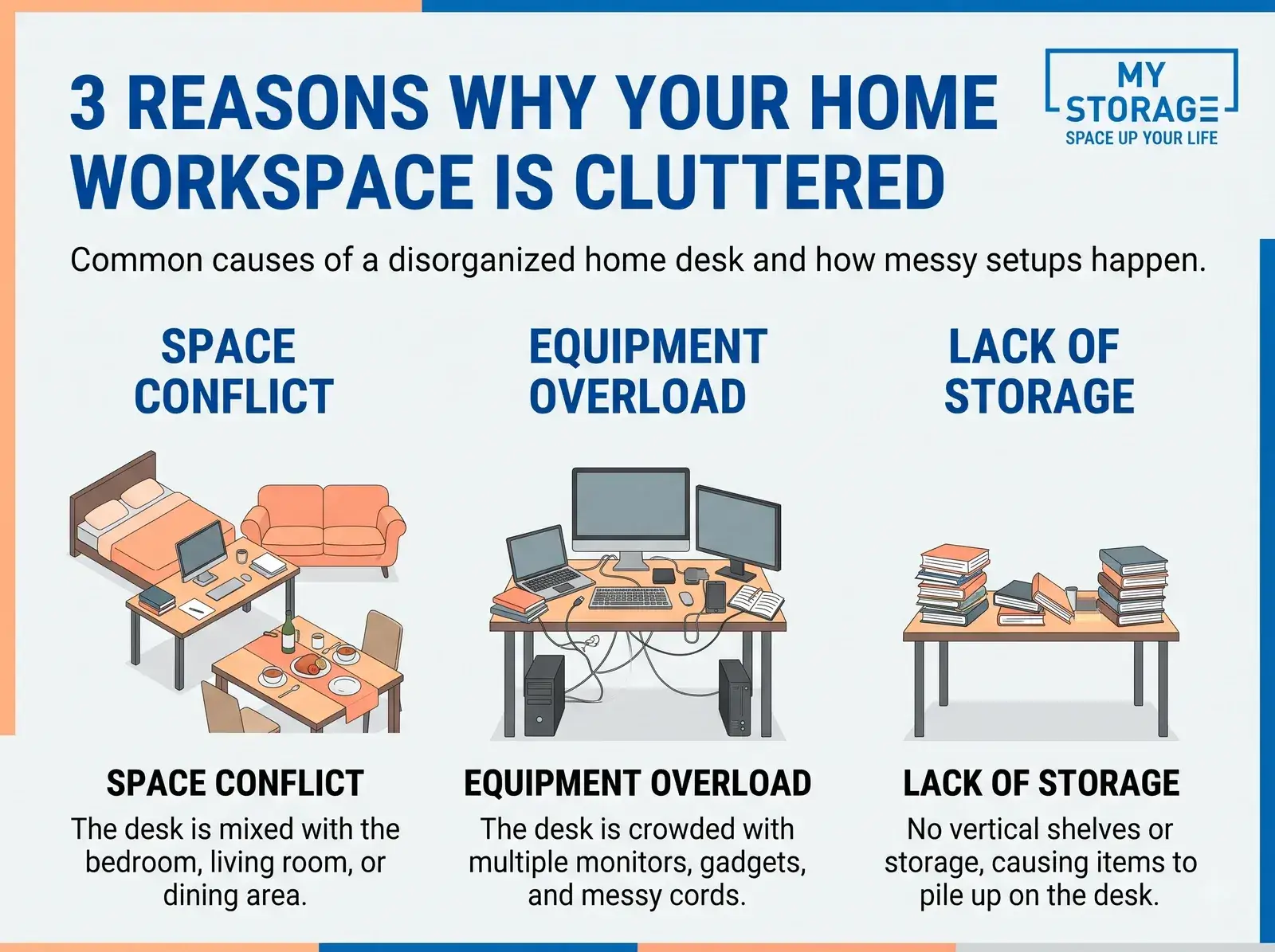
A home workspace in a small home quickly becomes messy because it shares space with everyday family life. The lack of a dedicated vertical storage system, plus the habit of piling electronics, charging cables and paperwork onto the desk, shrinks the space and seriously undermines your ability to concentrate.
Mixed Living and Working Space
The overlap between living and working environments creates a series of daily problems and blurs the line between rest and focus:
- A desk placed in a shared living area: Putting the desk in the living room, the bedroom or on the dining table means clearing your work gear away after every working day to give the space back to the family.
- Personal items colliding with work equipment: Snacks, cups, house keys and children's toys end up on the desk simply because it is within reach, which makes the space feel cramped and visually noisy.
- Losing the mental boundary between rest and work: Working right next to the bed makes it hard to switch off from work pressure at night, or the opposite: you feel the pull to lie down in the middle of a working day.
Too Much on the Desk
Keeping everything within arm's reach quickly overloads the desk surface with devices, tangled cables and scattered stationery:
- Devices take up the whole surface: A second monitor, a laptop, a mechanical keyboard, a mouse, a cooling pad and over-ear headphones occupy up to 70% of a small desk.
- Dozens of tangled cables: Computer power cords, phone chargers and monitor cables lying loose across the desk get in the way of your mouse hand and collect dust.
- Documents and stationery with no fixed home: Notebooks, receipts, pens and water glasses scattered everywhere cost an average of 15 minutes a day just looking for a pen or a sheet of paper.
No Vertical Storage System
Limited floor space makes people forget the wall above the desk, so documents and belongings end up stacked in piles:
- Only using horizontal surfaces: Without wall shelves, every file and reference book ends up in towering stacks on the desk. The principle of storing upwards is covered in how to organise a family storeroom neatly.
- Rarely used items occupying prime space: Spare cables, device boxes and archived files from previous years still sit in the handiest spots on the desk.
- Home cupboards with no zoning: Without dedicated drawers, work files get mixed in with household paperwork, which means things go missing when you urgently need to check something.
2. Where to Work in a Small Home
Choosing where to put a desk in a small home means using dead space while still getting natural light and enough separation from household noise. The ideal spots are a dead corner in the living room, the gap beside a bedroom window or an airy space under the stairs, all of which help you concentrate.
Using a Dead Wall Corner
A 90-degree wall corner is the forgotten prime spot that makes the most of dead space and creates a natural sense of separation from what is going on at home:
- Making use of the right angle: A small L-shaped corner desk or a triangular desk lets you use the entire gap between two walls without blocking the main walkway.
- A natural sense of separation: Sitting facing the corner keeps your field of view free of family members moving around.
- A quiet wall behind you: A solid wall behind your chair feels reassuring and looks professional when you have to turn the camera on for an online meeting.
Arranging It Well in the Bedroom
Placing the desk beside a bedroom window makes the most of daylight, but it needs a soft divider so it does not disturb your sleep:
- Using the space beside the window: Put the desk at a right angle to the window or against the sill to catch all the daylight, which rests your eyes and saves on lighting.
- A soft divider between desk and bed: Use a light curtain, an open-backed bookshelf or a rug under the desk to mark the boundary between the focused work zone and the sleeping area.
- Don't point the screen at the bed: Keep the blue light of the monitor away from the bed so you can fall into deep sleep once the computer is off.
Combining With the Living Room
Turn a corner of the living room into a comfortable open office with a slim console desk against the wall or a smart height-adjustable table:
- A slim console desk against the wall: Choose desks only 45 to 50 cm deep to place behind the sofa or along the hallway into the room. If you plan to use an apartment as a workplace or stockroom, first read the rules on using an apartment as a warehouse or office.
- A smart lifting coffee table: A living room coffee table whose top rises to 75 cm turns into a laptop desk in seconds.
- A quick tidy-up rule after office hours: The mouse, keyboard and notebooks all go into a closed drawer as soon as the working day ends, so the living room looks elegant again for guests.
3. Desk and Chair Setup for a Small Home
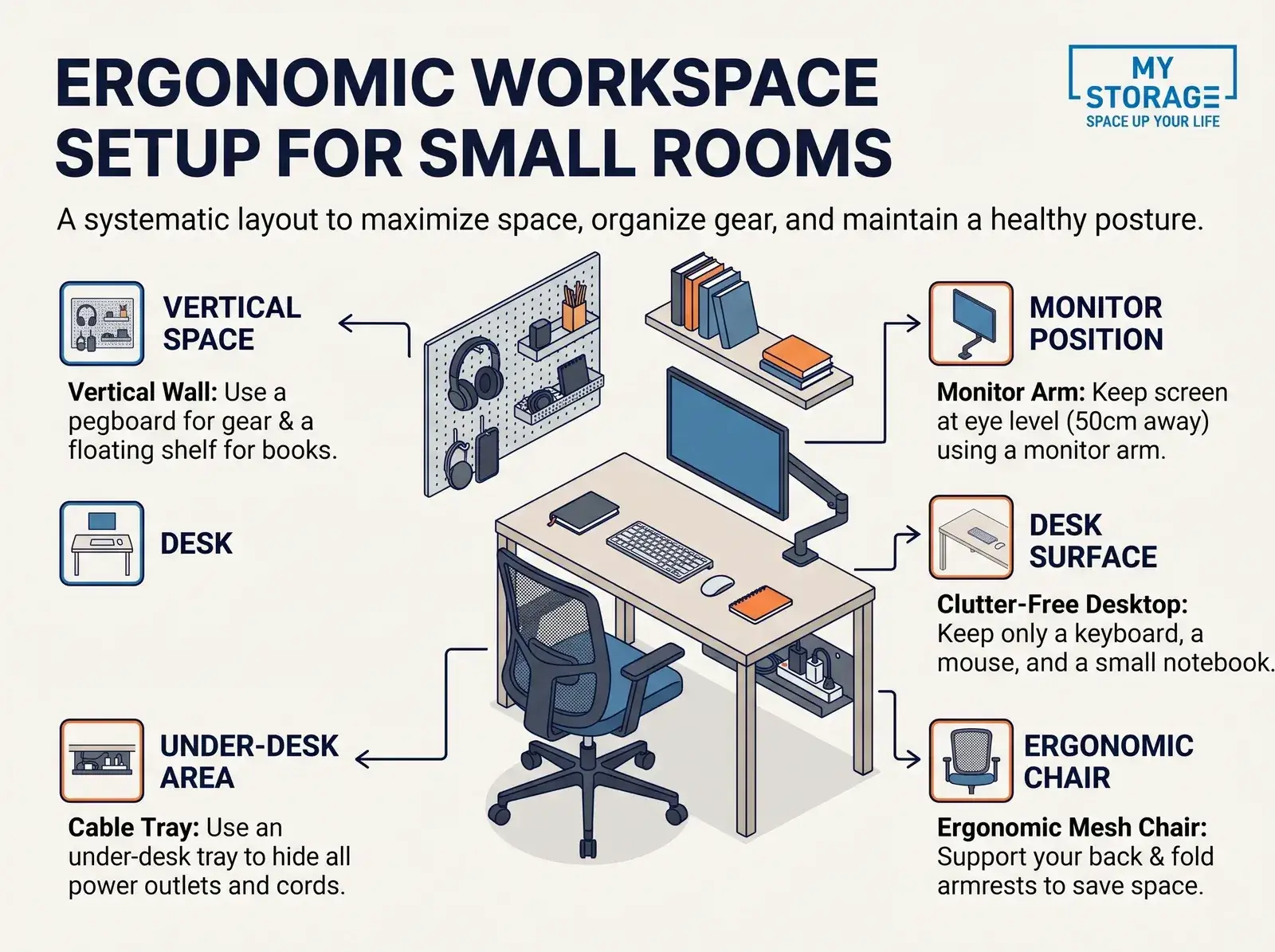
Furnishing a small workspace calls for a compact desk, an ergonomic chair that supports your spine and shelving that uses the height of the wall. Smart workspace tricks such as a multi-purpose pegboard and hidden cable routing free up as much floor space as possible.
Choosing a Compact Desk
A desk for a small room should be a compact 80 to 100 cm, or a smart wall-mounted folding design, to save floor space:
- Standard sizes for small spaces: A desk 80 to 100 cm long and 50 to 60 cm deep is enough for a 24-inch monitor and a laptop without taking over the room.
- Smart wall-mounted folding desk: When you are not working, the top folds flat against the wall like a picture, freeing 100% of the floor for other uses.
- A slim drawer under the desk: Add a keyboard tray or a 5 cm deep drawer for pens, notebooks and chargers, so the desktop stays completely clear. For rarely used items that no longer fit at home, see how to rent a personal mini storage unit by the month.
Using an Ergonomic Chair
An OSHA-standard ergonomic chair with folding armrests protects your spine and tucks neatly under the desk when not in use:
- Following OSHA ergonomic standards: The US Occupational Safety and Health Administration recommends a seat height that keeps the thighs parallel to the floor, the knees at 90 degrees and the feet flat on the ground.
- Choose a mid-back model without a large headrest: For small rooms, pick a mid-back mesh office chair with armrests that fold 90 degrees so the seat slides fully under the desk.
- A comfortable seat and lumbar support: This protects the L4-L5 vertebrae from wear when you sit and work 8 to 10 hours a day.
Using Vertical Wall Space
Using the wall above the desk with a pegboard and floating shelves is the most effective form of vertical storage:
- Installing a pegboard: Fix a metal or wooden pegboard to the wall in front of the desk and use hooks for headphones, scissors, a clock, your phone and a small plant.
- Floating wall shelves: Fix one or two wooden shelves 20 cm deep above eye level for professional books, project files and accessories such as a mini scanner.
- A magnetic or cork noteboard: Use it for sticky notes and the week's schedule instead of plastering notes around the edge of the monitor.
Hidden Cable Management
Hiding every socket and charger in an under-desk cable tray is what makes a workspace look minimal and professional:
- Fitting a cable management tray: Attach a metal mesh tray under the desktop to hold the extension socket, the laptop charger and the power cords.
- Using cable sleeves or hook-and-loop ties: Gather the mouse, keyboard and monitor cables into a single sleeve running down to the tray, so nothing dangles around your feet.
- Cable clips: Stick silicone clips along the desk edge so the phone charging cable does not fall to the floor every time you unplug.
4. Tips to Keep Your Desk Tidy
Keeping a desk tidy depends on controlling the essentials and dividing the surface into sensible zones. Applying proven ways to organise a desk, through the three reach zones, digitising paperwork and spending five minutes tidying at the end of the day, means you always start work with full focus.
Minimising What Sits on the Desk
Keeping only a computer, a notebook and a glass of water on the desk, combined with a monitor arm and a screen bar, frees up the working surface completely:
- The rule of three fixed items: Only three things should be on the desk while you work: the computer with mouse and keyboard, a small notebook and a glass of water. How to decide what to keep is covered in minimalism and what living with less really means.
- Using a monitor arm: Replace the bulky monitor stand with an arm clamped to the desk edge; the space freed under the screen can hold the keyboard when you need to read or write.
- A screen bar: A LED bar clipped to the top edge of the monitor lights the desk at 400 to 500 lux without using a single square centimetre for a lamp base.
The Three-Zone Desk Rule
Dividing the desk into three scientific reach zones is the international standard for optimising space, making work faster and less tiring:
- Zone 1 (primary reach, 25 - 40 cm): The area right in front of your chest is only for the keyboard, the mouse and the notebook you write in during the day, so both hands work naturally without stretching.
- Zone 2 (secondary reach, 40 - 70 cm): Within easy arm's reach, suitable for the monitor, a wireless charging pad and a spill-proof water glass.
- Zone 3 (extended reach, beyond 70 cm or overhead): For wall shelves, the pegboard or file trays, reached only when you need reference documents or spare accessories.
Sorting and Digitising Paperwork
Splitting paperwork into three dedicated trays and digitising every receipt into PDF removes piles of paper from the desk entirely:
- Three separate trays: Tray 1 (to handle today), Tray 2 (waiting for a weekly check) and Tray 3 (long-term files to move into a cupboard). For records you must keep by law, see how long accounting records and files must be kept.
- Digitising every receipt and paper document: Use a phone scanning app to turn documents into PDF files on Google Drive or Dropbox, then shred the drafts that no longer have legal value. Paper originals you must keep should be stored somewhere dry, following the guide to protecting belongings from damp.
- Consistent spine labels: Use a handheld label printer for each file folder so you can pull out a document without leafing through every page.
The Five-Minute Desk Rule
Spending five minutes at the end of the day putting things back, clearing rubbish and listing the three key tasks for tomorrow helps you start the next day with energy:
- Minute 1 - Put things back: Pens into the box, notebook into the drawer, headphones onto the pegboard hook.
- Minute 2 - Close everything and switch off the screen: Close unnecessary browser tabs and turn off the monitor to save power and reduce heat in the room.
- Minute 3 - Clear rubbish and dirty cups: Take coffee cups and wrappers to the kitchen sink; never leave a half-full glass on the desk overnight, as it can spill onto your devices.
- Minute 4 - A quick wipe of the surface: Use a damp microfibre cloth to clear dust and coffee marks so the surface stays clean.
- Minute 5 - List tomorrow's three key tasks: Write three tasks on a sticky note in front of you so you sit down the next morning with a clear goal.
5. Optimisation Checklist and 2027 Price List
Reviewing your workspace against an ergonomic checklist and taking stock of your belongings shows exactly which items are using space they don't need to. For long-archived documents or rarely used spare equipment, moving them into outside self-storage is the best option in 2027 for keeping the room airy. If you work and sell online from home, see also how to manage stock when selling online from home.
Workspace Optimisation Checklist
Review eight core criteria, from desk placement and ergonomics through to cable management, to be sure the workspace really is tidy:
| Criterion | What to Check | Standard to Meet |
|---|---|---|
| Desk placement | Not blocking the door, not sitting in the main walkway | Walkway at least 70 cm clear |
| Lighting | Natural window light combined with an anti-glare screen bar | 300 - 500 lux |
| Desk size | 80 to 120 cm long, 50 to 60 cm deep, fitting the corner | Room for the computer, mouse and keyboard |
| Desk zoning | Three clear reach zones (primary, secondary and extended) | Over 70% of the desk clear |
| Work chair | Ergonomic chair with lumbar support and folding armrests | Sitting at 90 degrees, comfortable |
| Screen position | Top edge at eye level, 50 to 70 cm from your eyes | Neck straight, not bent forward |
| Cable management | Every socket and cable hidden in the under-desk tray | No cables dangling on the floor |
| Document storage | Papers sorted into labelled folders, old receipts digitised as PDF | No untidy stacks of paper |
Common Mistakes to Avoid
Avoid buying an oversized desk, over-decorating or turning the space under the desk into a dumping ground that blocks your legs:
- Buying an oversized desk: A 1.6 m executive desk or a bulky gaming desk swallows the floor space of a small bedroom.
- Over-decorating: Too many figurines, large plants and photo frames on the desk noticeably shrink the space you need for the mouse.
- Turning the workspace into a dumping ground: Shoving cartons of new purchases and bags of clothes under the desk leaves no room to stretch your legs. Suitcases and rarely used items under the desk can be put to work following 7 ways to use a suitcase for storage.
Self-Storage Price List 2027
See the 2027 reference prices for personal self-storage units in Ho Chi Minh City to plan how to clear out surplus belongings: Details of each unit type are on the self-storage service page.
| Unit Type | Volume / Floor Area | Actual Capacity | Reference Price (VND/Month) |
|---|---|---|---|
| Mini Box Unit | 1 m³ to 3 m³ (about 0.5 - 1.2 m²) | About 8 to 25 cartons of documents, components and personal items | 550,000 - 1,200,000 (about US$21 - 47) |
| Standard Unit S | 4 m³ to 8 m³ (about 1.5 - 2.5 m²) | About 30 to 70 boxes (enough for spare equipment and extra furniture) | 1,400,000 - 2,600,000 (about US$54 - 101) |
| Business Unit M | 9 m³ to 15 m³ (about 3.5 - 5.0 m²) | About 80 to 140 large boxes (suits a small online shop's stock) | 2,900,000 - 4,800,000 (about US$113 - 186) |
| 24/7 Air-Conditioning Option | Based on the unit volume | Keeps 20°C - 24°C constantly (protects paper records and equipment from damp) | Surcharge 20% - 25% |
The prices above are for reference in the Vietnamese market in 2027. The actual cost may vary with the location of the unit, the length of a long-term contract and the promotions at each operating branch.
The Best Storage Solution
Moving rarely used equipment and archived files into the air-conditioned MyStorage self-storage system gives you back an airy workspace at home:
A tidy workspace is the key to creativity and career progress for anyone working remotely. Don't let boxes of old files, spare computers or seasonal household items take over the working space you value.
If you are looking for a safe place in Ho Chi Minh City to keep documents and work equipment, the MyStorage self-storage system is an ideal partner. With private personal units, 24/7 air conditioning that controls damp and mould, multi-layer camera security and flexible access, MyStorage lets you move every rarely used item out and gives you back an airy, inspiring workroom every day. The MyStorage site at 375 Vo Nguyen Giap also has a shared workspace for startups and online sellers, handy if you store stock and need somewhere to work and pack orders. You can see the storage unit size guide (1-23 m³), check mini storage prices by size or request a free quote.
6. Frequently Asked Questions
Here are 15 short, direct answers to the most common questions about setting up and optimising a work-from-home corner in a small home:
1. Does a small home need its own work corner?
It is well worth it: even a fixed corner of one square metre sets a clear mental boundary between work and rest, which markedly improves focus.
2. Where should the desk go?
The ideal spot is a corner that gets natural window light without the sun hitting the screen directly, or a quiet out-of-the-way corner of the living room.
3. What size desk suits a small room?
The optimal size for a small room is 80 to 100 cm long and 50 to 60 cm deep, just enough for a 24-inch monitor and a laptop.
4. Is a desk in the bedroom a good idea?
A desk in the bedroom works well if you face it towards the wall or the window and always clear it before going to bed.
5. How do you use a dead wall corner?
The best solution is a compact L-shaped corner desk with triangular wall shelves, which uses the whole gap between two walls.
6. Are wall-mounted folding desks durable?
A wall-mounted desk is very durable with load-bearing steel hinges fixed into solid brick with wall plugs, safely holding 30 to 50 kg in use.
7. How do you fit two monitors in a small space?
Use a dual monitor arm clamped to the desk edge and stack the screens vertically or in a narrow V, which frees the desk surface completely.
8. How do you hide cables neatly?
Fit a metal cable tray under the desk for the extension socket and chargers, then gather the cables into a sleeve running into it.
9. How do you lay out a desk tidily?
Apply the three reach zones along with a monitor arm and a cable tray to keep over 70% of the desk surface clear.
10. What are the key workspace tips?
Use the wall with a pegboard, choose an ergonomic chair with folding armrests, digitise paperwork and keep the five-minute tidy-up habit.
11. Where should the printer go?
Don't put the printer on a small desk; place it on a small trolley under the desk or in a corner of the room to avoid vibration.
12. How do you store documents without a cabinet?
Use labelled hard plastic document boxes on wall shelves, or upright multi-section file trays placed against the wall. Keeping papers free of damp in long-term storage is covered in the guide to storing books, files and documents.
13. Where should old tech go?
Sort spare cables and components into lidded compartment boxes and store them at the bottom of a wardrobe or under the bed rather than on the desk. See also how to store old laptops and tech equipment.
14. When should you rent outside storage?
Rent outside self-storage when boxes of archived files, online-business stock or personal items pile up enough to crowd the room. For business goods, see the business storage service or how to store livestream stock when home is tight.
15. How do you create a private corner in a shared home?
Use active noise-cancelling headphones, a light curtain divider or a folding screen, and agree focused working hours with the rest of the household. Tips for keeping the whole home tidy are in 8 simple ways to clean your home for Tet.
Related articles

Article
Suitcases Aren't Just For Travel: 7 Ways To Use A Suitcase For Storage
A travel suitcase can easily become a versatile storage solution at home when you have no trips planned.
Read article

Article
Should You Use Compression Bags When Traveling?
A compression bag is a solution that reduces the volume of clothing by 30% to 50%, helping optimize suitcase space when traveling or going on business trips.
Read article

Article
Weekend Home Cleaning Checklist: 30 Minutes To A Tidier Home 2027
Spending 30 minutes on a weekend tidy-up with a well-structured checklist keeps apartments of 45 to 60 m² orderly without draining the energy you need for rest.
Read article
