
 Tiếng Việt
 한국어
 日本語
Article
FIFO vs FEFO: What They Mean and How to Apply Them in Excel

On this page
FIFO (First In, First Out) and FEFO (First Expired, First Out) are the two classic stock rotation rules that help a business cut losses from expired and outdated goods. Running FIFO and FEFO in Excel with a batch-tracking table, the SUMIF and SORTBY functions and Conditional Formatting lets warehouse staff see exactly which batch to ship first, with no software cost. When stock at home starts mixing old and new batches, you can keep each batch separate in MyStorage self-storage in Ho Chi Minh City.
1. FIFO and FEFO Explained: What They Mean and Why Warehouses Use Them
FIFO means first in, first out: the batches received earliest are released first, so stock does not sit and lose value. FEFO means first expired, first out: the items closest to their expiry date ship first, whatever order they arrived in. Applying both rules properly helps a business sharply reduce the risk of writing off expired goods.
What Is FIFO? First In, First Out
The FIFO method (First In, First Out) works from the receiving timeline of each batch:
- How it works: The batch that was received into the warehouse first is picked and shipped to customers first.
- Products it suits: Ideal for items with no expiry date printed on the packaging, or long-life products that still go out of date with trends, such as electronics, phone accessories, household goods and fashion.
- Worked example: A shop receives batch A of 50 sweaters on 01/11/2026 and batch B of 50 of the same model on 10/11/2026. When an order for 30 sweaters comes in on 15/11/2026, the storekeeper must pick from batch A first and leave batch B untouched.
What Is FEFO? First Expired, First Out
The FEFO method (First Expired, First Out) uses the expiry date as the top priority:
- How it works: The batch with the nearest expiry date (EXP) is shipped first, regardless of whether it was received before or after the others.
- Products it suits: Mandatory for short-life, time-sensitive categories such as fresh milk, confectionery, fresh food, skincare cosmetics, personal-care chemicals and medical pharmaceuticals.
- Worked example: A warehouse receives shower gel batch Alpha on 01/11/2026 with an expiry of 30/12/2026; on 05/11/2026 it receives batch Beta from another factory which, because of its production run, expires on 15/12/2026. Under FEFO the storekeeper ships batch Beta first, because it expires half a month before batch Alpha.
Core Benefits of FIFO and FEFO for a Business
Setting up shipping discipline around these two methods brings large operational and financial value:
- Removes the risk of destroying expired stock: Stops old cartons being forgotten in a corner of the shelving until they are found past their date and must be destroyed outright.
- Protects working capital: Minimises goods losing value through fading, yellowing or torn packaging after sitting too long in a damp warehouse.
- Raises customer satisfaction: Makes sure products reach consumers with a fresh date and plenty of shelf life left, which limits complaints and returns.
- Speeds up traceability: When a technical fault or a factory recall occurs, the business can easily pinpoint exactly which batch code sits where in the warehouse and act in time.
The table below shows the difference in how stock ships under FIFO and FEFO:
| Rule | Batch shipped first | Batch held back | Basis for the decision |
|---|---|---|---|
| FIFO | Older batch (received 01/11) | Newer batch (received 10/11) | Receiving date |
| FEFO | Short-dated batch (EXP 15/12) | Long-dated batch (EXP 30/12), even though it arrived first | Expiry date printed on the label |
2. FIFO vs FEFO: Which Method Suits Which Product Category
The core difference between FIFO and FEFO is the shipping priority: FIFO goes by the date goods were received, FEFO by the expiry date printed on the packaging. Fashion and household goods should use FIFO to avoid going out of style, while food, cosmetics and pharmaceuticals must prioritise FEFO to protect consumers and meet quality standards.
Detailed Comparison of FIFO and FEFO
The table below gives managers a clear side-by-side view of the two methods:
| Comparison Criterion | FIFO (First In, First Out) | FEFO (First Expired, First Out) |
|---|---|---|
| Priority criterion | Date goods are received into the warehouse (Receipt Date) | Expiry date printed on the label (Expiry Date) |
| Picking order | The earliest received batch is picked first | The batch with the nearest expiry date is picked first |
| Suitable goods | Durable goods with no date stamp, fashion items by style | Fast-moving consumer goods, food, pharmaceuticals and cosmetics |
| Main management goal | Reduce Inventory Age and avoid old stock piling up | Reduce the rate of Expired Goods and protect users |
| Data that must be tracked | SKU, Batch Code, Receipt Date, Quantity Received | SKU, Batch Code, Expiry Date, Receipt Date, Quantity |
| Related standards | Vietnamese Accounting Standard VAS 02 (inventory valuation) | GMP, GDP, ISO 22000 and HACCP safety standards |
Product Categories Suited to FIFO
First in, first out works best in lines of business whose products change little biologically over time:
- Fashion and apparel: Clothes, shoes and bags are highly seasonal; FIFO clears older collections quickly before new trends arrive.
- Electronics and tech accessories: Phones, headphones and chargers and computer parts lose value quickly when newer models launch, so they need to rotate fast.
- Building materials and furniture: Wall paint, tiles, screws and wooden furniture have no fixed expiry, but sitting too long in storage lets them collect dust, degrade on the surface or rust.
- Toys and souvenir gifts: Model products and event gifts need steady rotation so the boxes do not get dented over time.
Product Categories That Require FEFO
For goods that directly affect human health, outbound control must be tied to the expiry date:
- Pharmaceuticals and medical supplies: Antibiotics, vaccines and infusion fluids must be strictly controlled by FEFO under the Ministry of Health's Good Storage Practice (GSP) and Good Distribution Practice (GDP) standards.
- Food and beverages: Fresh milk, confectionery, canned goods and soft drinks must comply strictly with food safety standards so that no out-of-date goods reach the market.
- Cosmetics and personal-care products: Skin serums, sunscreen and lipstick contain active ingredients that oxidise easily and lose effect after opening or close to the date.
- Laboratory chemicals and specialist paints: Some industrial adhesives, hardeners and solvent-based paints have a very short shelf life from the production date.
Combining FIFO and FEFO in Practice
In modern warehouse management the two rules are usually combined in a clear order of priority:
- Priority 1: always check FEFO first: Any batch with the nearest expiry date goes to the top of the picking and packing list.
- Priority 2: use FIFO as the tiebreaker: When two or more batches share the same expiry date (EXP), the system looks at the receiving date and ships the earlier-received batch first.
- The overriding exclusion rule: Never ship expired goods, or goods under the safe threshold (for example medicine with less than 3 months left), to a customer just because that batch is next in the queue; move them straight to a quarantine area for goods awaiting a decision.
3. How to Set Up an Excel File for FIFO and FEFO Warehouse Management
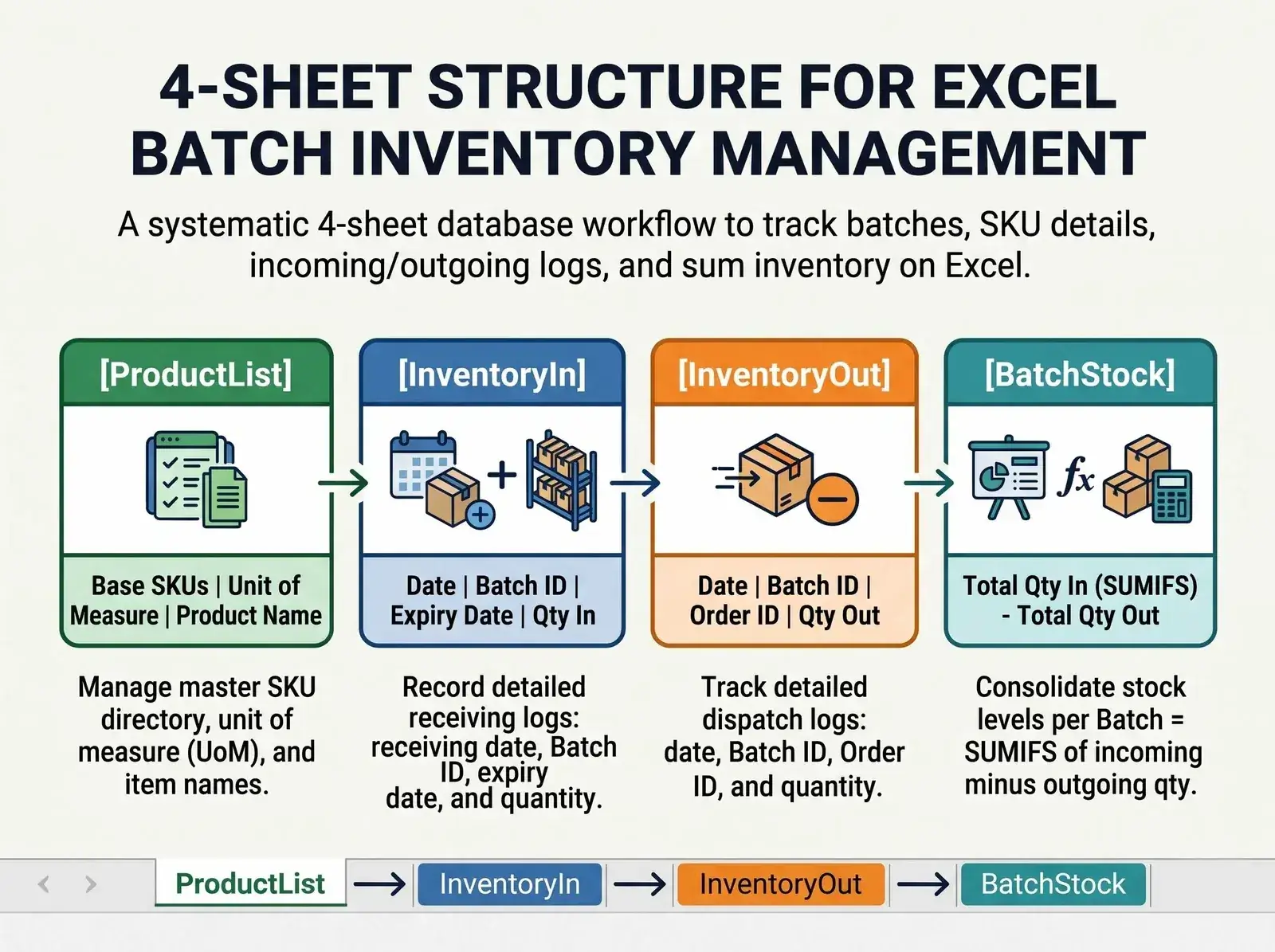
Setting up an Excel file for FIFO and FEFO needs a spreadsheet that tracks stock down to each batch number (Batch/Lot number) rather than only totalling by SKU. By building 4 linked sheets for Product List, Receiving, Shipping and Batch Stock, combined with SUMIF and SORTBY, you can pull out the shipping priority automatically.
Designing a Standard 4-Sheet Excel Structure
A professional workbook separates the data flows cleanly to avoid formula conflicts:
- Sheet 1 -
DanhMucSP(product list): Holds the fixed information: SKU, product name, unit of measure, minimum stock level and product group. - Sheet 2 -
NhapKho(receiving log by batch): Records each receipt with the receiving date, receipt number, SKU, batch code, manufacturing date (MFG), expiry date (EXP), quantity received and unit price. - Sheet 3 -
XuatKho(shipping log by batch): Records the shipping date, issue number, SKU, the batch actually picked, quantity shipped and order number. - Sheet 4 -
TonTheoLo(detailed stock report by batch): Automatically totals quantity received, quantity shipped, current balance, days left to expiry and the shipping priority status under FIFO or FEFO.
| Sheet | Role in batch management |
|---|---|
DanhMucSP | Manages the master SKU, unit of measure and product name |
NhapKho | Detail: receiving date, batch code, expiry date, quantity received |
XuatKho | Detail: shipping date, batch code, order number, quantity shipped |
TonTheoLo | Stock per batch = quantity received (SUMIF) − quantity shipped |
Check the balance on the TonTheoLo sheet against a physical count on a regular basis using cycle counting, so the spreadsheet always matches what is on the shelf.
Building the Batch Tracking Table
For FIFO and FEFO to work properly, every row on the NhapKho sheet must be an independent batch. Using batch codes consistently is also the standardisation step in the 5S standard for warehouse management (dates are written day/month/year):
| SKU | Product Name | Batch Code | Receipt Date | Expiry Date | Quantity Received | Note |
|---|---|---|---|---|---|---|
| MP001 | Whitening Face Cream | LOT-A26 | 01/11/2026 | 30/12/2026 | 100 | First receipt |
| MP001 | Whitening Face Cream | LOT-B26 | 05/11/2026 | 15/12/2026 | 80 | Closer to expiry |
| MP001 | Whitening Face Cream | LOT-C26 | 12/11/2026 | 28/02/2027 | 150 | Long-dated |
| GD002 | Air Fryer | LOT-NC01 | 02/11/2026 | None | 50 | FIFO item |
Important: Never combine different receipts into one row if they differ in receiving date or in the expiry date printed on the packaging.
Excel Formulas for Actual Stock per Batch
Before entering any formula, fix the column layout of the TonTheoLo sheet so every formula below points at the right cell. The NhapKho sheet follows the sample above: column C is the batch code, column D the receipt date, column E the expiry date and column F the quantity received.
| Column | Content on the TonTheoLo sheet | Where the data comes from |
|---|---|---|
| A | SKU | Entered per batch |
| B | Product name | Entered per batch |
| C | Batch code, the lookup key for every formula | Entered exactly as on the NhapKho sheet |
| D | Total quantity received | SUMIF on the NhapKho sheet |
| E | Total quantity shipped | SUMIF on the XuatKho sheet |
| F | Current stock | Column D minus column E |
| G | Expiry date | Looked up from the NhapKho sheet |
| H | Alert status | IF formula in section 4 |
| I | Receipt date | Looked up from the NhapKho sheet |
On the TonTheoLo sheet we use the SUMIF function to calculate the instant stock balance of each specific batch code:
- Formula for total quantity received for a batch: Placed in column D of the
TonTheoLosheet (with cell C2 holding the batch code to look up):=SUMIF(NhapKho!C:C, C2, NhapKho!F:F)Where:
NhapKho!C:Cholds the receiving batch code andNhapKho!F:Fholds the actual quantity received. - Formula for total quantity shipped for a batch: Placed in column E of the
TonTheoLosheet:=SUMIF(XuatKho!C:C, C2, XuatKho!E:E)Where:
XuatKho!C:Cholds the shipping batch code andXuatKho!E:Eholds the actual quantity shipped. - Formula for current available stock: Placed in column F of the
TonTheoLosheet:=D2 - E2Or combine it into a single formula:
=SUMIF(NhapKho!C:C, C2, NhapKho!F:F) - SUMIF(XuatKho!C:C, C2, XuatKho!E:E) - Formula to fetch a batch's expiry date: Placed in column G of the
TonTheoLosheet:=INDEX(NhapKho!E:E, MATCH(C2, NhapKho!C:C, 0))Where:
MATCHfinds the row holding the batch code inNhapKho!C:C, andINDEXreturns the expiry date in columnNhapKho!E:Eof that same row. - Formula to fetch a batch's receipt date: Placed in column I of the
TonTheoLosheet:=INDEX(NhapKho!D:D, MATCH(C2, NhapKho!C:C, 0))Where:
NhapKho!D:Dholds the receipt date. Column I is used to sort by FIFO in the next part.
If the stock balance comes back negative or does not match reality, check the batch codes between the NhapKho and XuatKho sheets, and see the guide to fixing Excel warehouse formula errors and locking data.
Setting the Shipping Priority with Sort & Filter and the SORTBY Function
Once you have the stock figure for each batch, you can set the picking priority under either of the two rules:
- Manual method with Sort & Filter: Turn on filtering (Ctrl + Shift + L) on the
TonTheoLotable. Filter the Current Stock column to > 0. To ship by FIFO, sort the Receipt Date column (column I) from oldest to newest. To ship by FEFO, sort the Expiry Date column (column G) from earliest to latest. - Automatic method with the SORTBY function (Excel 365 or Excel 2021 and later): Create a suggested-shipping table that automatically extracts the batches still in stock in expiry order:
=SORTBY(FILTER(TonTheoLo!A2:I100, TonTheoLo!F2:F100 > 0), FILTER(TonTheoLo!G2:G100, TonTheoLo!F2:F100 > 0), 1)Explanation: The
FILTERfunction pulls out every batch with stock greater than 0, thenSORTBYsorts by column G (Expiry Date) with the parameter1(ascending), so the batches with the nearest expiry automatically rise to the top. This list is only right when the goods in the warehouse are also arranged by zone and batch code, so the batch to ship is always in the easiest position to reach.
4. Applying FIFO and FEFO in Excel: Worked Examples
Applying FIFO and FEFO in Excel means matching the quantity on each order against the available balance of each batch, in the sorted priority order. By combining an IF formula that checks the days left to expiry with Conditional Formatting colour fill, the Excel file proactively raises an early warning 30 days ahead for batches nearing their expiry date. For the alert to be useful, tie it into a standard 7-step warehouse operating procedure covering receiving, storage and shipping.
FIFO Shipping Scenario in Excel
Suppose a distributor sells an air fryer (code GD002) with no expiry date, and actual stock is: batch LOT-01 received on 01/11 with 40 units left; batch LOT-02 received on 10/11 with 60 units left.
- When an order for 60 units comes in:
- The storekeeper checks the Excel table, sees that LOT-01 was received earliest, and ships all 40 units of that batch first.
- The 20 units still needed are taken from batch LOT-02.
- Recording it on the
XuatKhosheet in Excel: The order must be split into 2 separate rows:- Row 1: batch code LOT-01, quantity shipped: 40. (LOT-01 officially drops to zero stock.)
- Row 2: batch code LOT-02, quantity shipped: 20. (LOT-02 keeps 40 units for the next orders.)
FEFO Shipping Scenario in Excel
Take a cosmetics product (code MP001) with the following receiving and expiry status:
- Batch LOT-A26: received 01/11/2026, expires 30/12/2026, stock: 100 boxes.
- Batch LOT-B26: received 05/11/2026, expires 15/12/2026, stock: 80 boxes.
- Batch LOT-C26: received 12/11/2026, expires 28/02/2027, stock: 150 boxes.
- When a wholesale order for 120 boxes comes in:
- Although LOT-A26 was received first, under FEFO batch LOT-B26 has the shortest expiry (15/12/2026) and must ship first.
- The storekeeper takes all 80 boxes from batch LOT-B26.
- The remaining 40 boxes are taken from the next-nearest expiry, batch LOT-A26.
- Recording it on the
XuatKhosheet in Excel: Split it into 2 shipping rows:- Row 1: batch LOT-B26, quantity shipped: 80.
- Row 2: batch LOT-A26, quantity shipped: 40.
- This way batch LOT-B26 is cleared completely, avoiding any risk of it expiring in mid-December.
Setting Up Expiry Alert Formulas with Conditional Formatting
So that warehouse staff do not miss batches that are about to expire, set up a status formula and automatic cell colouring:
- Status alert formula: In column H (Status) of the
TonTheoLosheet, enter:=IF(F2<=0, "OUT OF STOCK", IF(G2<TODAY(), "EXPIRED", IF(G2<=TODAY()+30, "EXPIRING SOON (Under 30 Days)", IF(G2<=TODAY()+60, "NEEDS MONITORING (Under 60 Days)", "SAFE"))))Where: Cell
F2is the stock balance, cellG2is the expiry date, and theTODAY()function returns the computer's current date. - Setting up the automatic colour rules (Conditional Formatting):
- Select the data range of the Status column, go to
Home>Conditional Formatting>New Rule> chooseFormat only cells that contain. - Condition 1: Cell Value equal to
="EXPIRED"→ dark red fill, white text. - Condition 2: Cell Value equal to
="EXPIRING SOON (Under 30 Days)"→ orange-yellow fill, black text. - Condition 3: Cell Value equal to
="SAFE"→ light green fill.
- Select the data range of the Status column, go to
For cosmetics and other temperature-sensitive goods, the date printed on the label is only reliable when the stock is kept in suitable conditions, so consider air-conditioned, temperature-controlled storage for these batches.
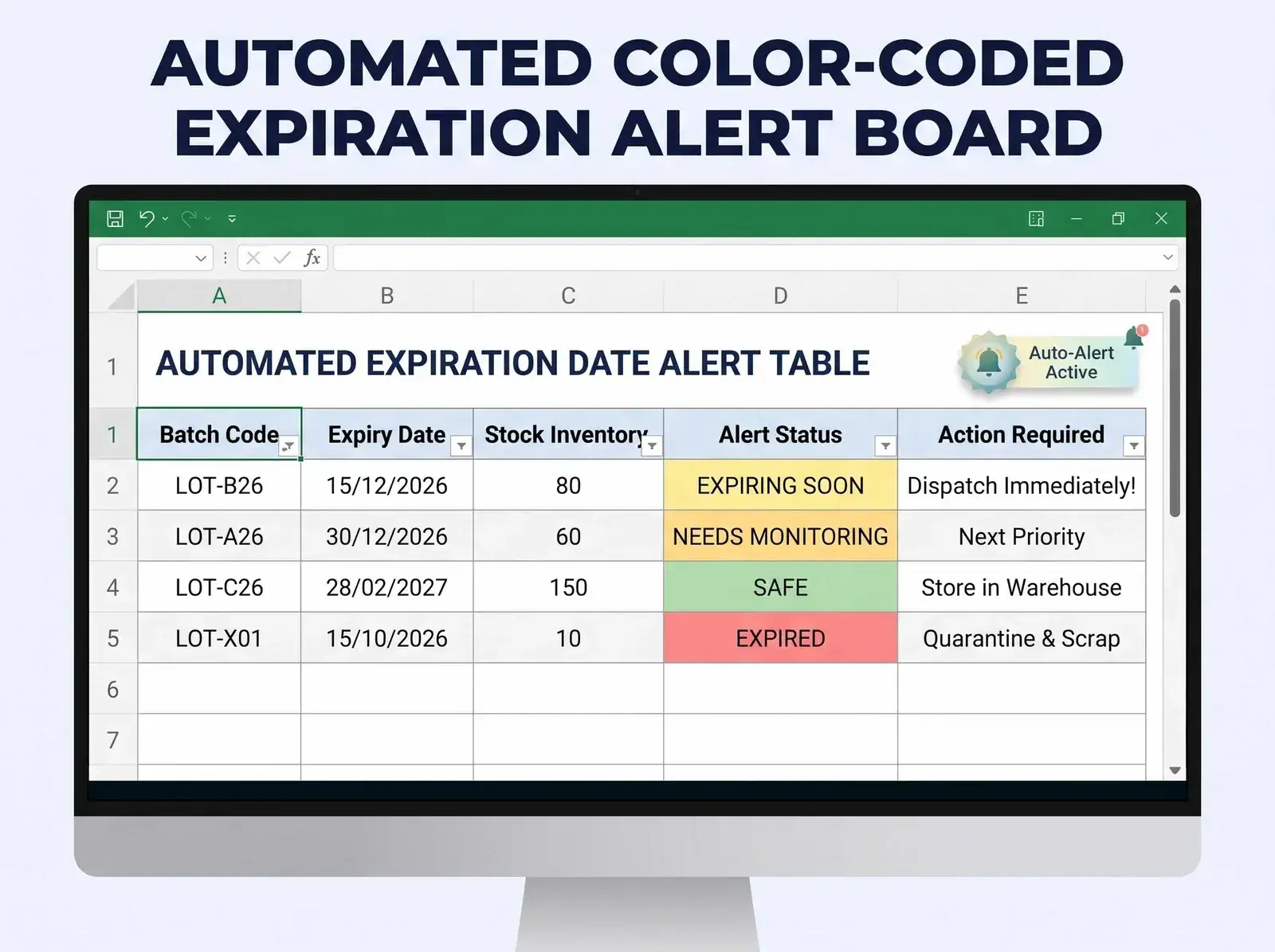
A sample result after applying the alert formula and automatic colouring:
| Batch Code | Expiry Date | Stock | Alert Status | Warehouse Action |
|---|---|---|---|---|
| LOT-B26 | 15/12/2026 | 80 | Expiring soon (yellow) | Ship now |
| LOT-A26 | 30/12/2026 | 60 | Needs monitoring (yellow) | Next priority |
| LOT-C26 | 28/02/2027 | 150 | Safe (green) | Keep in stock |
| LOT-X01 | 15/10/2026 | 10 | Expired (red) | Quarantine for disposal |
Common Mistakes When Managing FIFO and FEFO in Excel
Many small businesses run into serious problems with inventory management even though they have a spreadsheet, because of the following shortcomings:
- Tracking stock only by a generic SKU: Combining every batch received on different dates into a single row means the sheet cannot tell how many units remain for each date.
- Not recording the batch code on shipping: Packers write only the quantity shipped and forget to note which batch the goods came from, so the batch stock in Excel drifts away from reality.
- Excel figures that do not match the physical location: The sheet says to ship batch B26, but out in the warehouse staff grab batch C26 from the outermost shelf level because they do not want to climb for the one inside. Choosing the right shelving type for rotating stock keeps the batch to ship in the easiest place to reach.
- Several people editing formulas: A shared Excel file on an internal network makes it easy for someone to delete a
SUMIFformula by mistake or paste over data and skew the results.
5. When Should a Business Move from Excel to Warehouse Software?
Excel is an excellent free stock tool for small shops with under 200 batches, but it shows its limits when order volume jumps and many people enter data. When a business opens several branches, sells across multiple channels or needs real-time barcode scanning, moving to dedicated warehouse software or a WMS (warehouse management system) is the inevitable step.
Technical Limits of Excel as the Warehouse Grows
Once a business outgrows a single small shop, the built-in weaknesses of a spreadsheet start to show:
- Prone to multi-user data conflicts: Excel was not designed for dozens of staff scanning receipts and shipments at several points at once; the file easily freezes or overwrites data.
- No mechanism to stop wrong-batch picking: Excel only shows a passive report; if warehouse staff pick a near-dated item by mistake in real life, Excel cannot sound an instant alert the way a dedicated barcode scanner does.
- Hard to trace edit history: When stock turns negative or a quantity is wrong, it is very difficult for a manager to find out who changed that cell and when.
- Slow with large data: Once the receiving and shipping log passes tens of thousands of rows, array formulas and Conditional Formatting make the file open very slowly and lag constantly.
Advantages of Professional Warehouse Management Software
Upgrading to warehouse management software, or learning what a WMS is, brings a leap in operating productivity:
- Smart pick routing (Pick-to-order): A WMS automatically points to the exact shelf location (Aisle - Rack - Shelf - Bin) holding the batch to ship under FEFO and guides staff along the shortest route.
- Barcode scanning to prevent wrong-batch picks: Staff must scan the correct barcode of the suggested batch on a PDA; if they scan a long-dated batch by mistake, the device sounds a red alert and will not let the shipping note print.
- Real-time inventory sync across marketplaces: Connects the balance of each batch directly to e-commerce marketplaces such as Shopee, TikTok Shop and Lazada, to stop selling automatically when goods are out of date.
- Integrated cycle counting process: Reconciles the quantity of each batch code on a daily or weekly cycle without closing the whole warehouse.
Options for Expanding Storage Space as Volume Grows
Alongside upgrading software, organising the physical floor is a precondition for FIFO and FEFO to succeed:
- Purpose-built shelving for rotation: Invest in gravity flow racks that let new cartons slide in from the back and old cartons come out from the front, automatically creating a perfect mechanical FIFO cycle.
- Use a pallet system: Each pallet holds a single batch code, with an information sheet attached to the outside so forklifts can reach it fast without manually unloading and reshuffling goods.
- Personal self-storage for online shops: When stock at home becomes overloaded and old and new batches get mixed up, renting self-storage outside the home is a flexible way to add space. The business stays in control of dividing the shelving, tracking expiry dates and timing its own packing and shipping.
Not sure how many cubic metres your batches need? Estimate it with the AI tool below:
6. Reference Prices for Goods Storage
To help shops, online sellers and small and medium businesses optimise floor-space costs when managing stock by batch, self-storage offers flexible monthly plans. Below are 2027 reference prices for self-storage in Ho Chi Minh City, for the flexible monthly plan, excluding VAT:
| Unit Size | Actual Capacity | Standard Storage (per month) | Air-Conditioned Storage (per month) |
|---|---|---|---|
| 1 m³ | About 8 to 10 medium cartons, suitable for a small cosmetics or supplements shop | 873,000 – 965,000 VND (about US$34–37) | 1,136,000 – 1,256,000 VND (about US$44–49) |
| 2 m³ | About 15 to 20 medium cartons | 1,185,000 – 1,309,000 VND (about US$46–51) | 1,630,000 – 1,802,000 VND (about US$63–70) |
| 3 m³ | About 25 to 30 medium cartons, enough to shelve batches by date | 1,415,000 – 1,563,000 VND (about US$55–61) | 1,869,000 – 2,065,000 VND (about US$73–80) |
| 5 m³ | About 40 to 50 medium cartons | 1,796,000 – 1,984,000 VND (about US$70–77) | 2,524,000 – 2,790,000 VND (about US$98–108) |
| 7 m³ | About 55 to 70 medium cartons | 2,612,000 – 2,886,000 VND (about US$101–112) | 3,533,000 – 3,905,000 VND (about US$137–152) |
| 10 m³ or more | From about 80 medium cartons, depending on the volume rented | 3,533,000 – 3,905,000 VND (about US$137–152) | 4,853,000 – 5,363,000 VND (about US$189–208) |
These are reference prices for 2027, billed in VND; the figures in brackets are approximate conversions, and exchange rates move. Actual cost depends on the unit location, the contract length and the services included. The air-conditioned column suits cosmetics, supplements and other temperature-sensitive goods. You can check the exact price for your size with the tool below.
7. A Practical Solution for Managing Stock by Batch
Running stock in and out to the FIFO and FEFO standard is not just a data-handling technique in an Excel spreadsheet; it is a core cash-flow discipline that helps a business survive and break through. By digitising batch tracking, setting automatic alert formulas and building discipline in the staff who pick goods, you eliminate the risk of near-dated stock and raise your brand's reputation with partners and customers.
If you are looking for an independent, clean storage space with continuous air-conditioned storage that is easy to zone by batch in Ho Chi Minh City, MyStorage self-storage is an ideal partner. With a range of unit sizes, layered security and convenient access hours, MyStorage gives you full control to organise shelving to FIFO and FEFO standards and run your business at its best.
Store Stock by Batch and Work on Site at the 375 Vo Nguyen Giap Site
The 375 Vo Nguyen Giap site (An Khanh, Thu Duc City) has a workspace area for startups and online sellers alongside its self-storage units. You can sit and update the batch in/out Excel file, reconcile the balance of each batch code, then take the exact batch you need to ship out of your unit and pack it on the spot, instead of hauling goods home to pack and then out again to the post office. This keeps the spreadsheet and the physical stock in step, which is exactly what FIFO and FEFO need.
See the MyStorage locations in Ho Chi Minh City to pick the nearest site, or contact MyStorage for advice on the unit that fits your number of batches.
8. Frequently Asked Questions About FIFO and FEFO in Excel
The core questions and real-world situations that come up most when applying FIFO and FEFO in an Excel spreadsheet:
What is the fundamental difference between FIFO and FEFO?
The fundamental difference is the criterion for choosing which batch to ship: FIFO goes by the date goods were received (the batch received first ships first), while FEFO goes by the expiry date printed on the product (the batch that expires first ships first). FIFO suits goods with no expiry date, while FEFO is mandatory for goods with a clear expiry date.
Can FIFO be used for goods that have an expiry date?
FIFO can be used for goods with an expiry date if the manufacturer always supplies new goods in production order (a later-received batch always has a later date than an earlier one). However, if the factory delivers a later batch with a shorter shelf life than the earlier one, applying FIFO rigidly leaves the short-dated batch behind and risks it expiring in the warehouse.
Is FEFO mandatory for the pharmaceutical and food industries?
Under good practice standards in pharmaceuticals such as GSP (Good Storage Practice), and international food safety standards such as ISO 22000 and HACCP, FEFO is a mandatory quality control requirement. Businesses distributing pharmaceuticals and food must be able to show a shipping procedure that prioritises the batches with the shortest expiry to protect consumer health.
What does Vietnamese Accounting Standard VAS 02 say about the FIFO method for valuing inventory?
Under Vietnamese Accounting Standard No. 02 (VAS 02) and Circular 200/2014/TT-BTC, FIFO is formally recognised for valuing inventory issued. The value of goods issued is calculated at the cost of the batch received first, and the value of closing inventory at the cost of the most recently received batches.
When two batches have the same expiry date, which should ship first under FEFO?
When two batches share the same expiry date (EXP), standard warehouse practice uses FIFO as the tiebreaker. In other words, of two batches that expire on the same day, the one received first is picked and shipped first to reduce the time it sits on the shelf.
How can I automatically colour batches that are about to expire in an Excel sheet?
Use Conditional Formatting on the Home tab in Excel. Select the whole column holding the expiry date or the alert status column and create a new rule with the formula =$G2<=TODAY()+30 (where G2 is the cell holding the expiry date, and the $ sign keeps column G fixed when the rule is applied to the status column as well). Then choose a yellow or red fill; Excel will compare against the computer's current date and recolour the batches nearing their date automatically.
Which Excel formula automatically finds the batch code with the nearest expiry date that still has stock?
On newer Excel versions that support dynamic arrays, you can combine the INDEX, SORTBY and FILTER functions. The formula =INDEX(SORTBY(FILTER(C2:C100, F2:F100>0), FILTER(G2:G100, F2:F100>0), 1), 1) automatically returns the batch code (column C) with the earliest expiry date (column G) among the batches whose stock (column F) is greater than 0. If the formula reports an error or returns an odd result, see the guide to fixing Excel warehouse formula errors.
Why does the batch stock formula in Excel sometimes return a wrong result or a negative number?
The most common cause is that the batch codes on the NhapKho and XuatKho sheets do not match exactly, character for character, for example a stray trailing space (such as "LOT-01 " instead of "LOT-01"). To fix this, use Data Validation (a drop-down list) so staff pick the exact batch code instead of typing it, or use the TRIM function to strip the extra space. You can also see how to build a proper Excel stock in/out file to avoid these errors from the start.
Can Excel automatically split a shipment across several batches at once?
Plain Excel finds it very hard to split an order of 100 products into 40 from batch A and 60 from batch B using ordinary formulas alone, without VBA programming (Visual Basic for Applications). With a basic Excel file, the manager usually reads the suggested priority table and types the actual quantity shipped on each batch row.
What should I watch for when naming batch codes (Lot Numbers) in Excel to avoid duplicates?
Batch codes should follow a standardised structure carrying identifying information: [SKU] - [Year Month] - [Batch Sequence Number]. For example: MP001-2611-L01. This structure keeps batch codes from ever colliding between different products and lets the storekeeper see at once when the batch entered the system. The batch code should be printed on a label on the outside of the pallet or carton so the storekeeper can check it quickly while picking.
Should returned goods be recorded in the old batch or given a new batch code under FIFO/FEFO?
When handling returns through the proper returns processing procedure, if the product still has its original packaging and original batch label, record it back into the old batch code in Excel. If the original batch cannot be identified, create a separate batch code (for example LOT-HOAN-01) with the actual expiry date you can verify, so the goods can be controlled under FEFO separately.
What if a supplier delivers a later batch with a shorter expiry date than the earlier batch?
In real supply chains this happens fairly often because suppliers ship from different transit warehouses. When it happens, if your warehouse applies FEFO, simply enter the real expiry date of the new batch in the Excel file; the FEFO system will automatically push this new batch to the top of the list to ship before the older batch.
How can I stop warehouse staff grabbing whatever is convenient instead of the batch Excel suggests?
To fix human error, besides the Excel sheet, the warehouse should put clear batch location signs on the floor following the 5S standard and apply this rule: the batch to ship first always sits on the outer shelf levels, at eye height. Also, the shipping note given to the picker should print the required Batch Code in bold, with a signature confirming the packer's responsibility.
Can an Excel FIFO/FEFO spreadsheet connect to a wireless barcode scanner?
Yes. Most handheld barcode scanners today work as an emulated keyboard (USB HID). When you place the cursor in the Batch Code cell in Excel and pull the trigger to scan the barcode on a carton, the batch code string is filled into that cell automatically, followed by an automatic Enter that moves down a row, which is very convenient.
At what scale should an online cosmetics business stop using Excel and move to warehouse software?
When a cosmetics business reaches 50 orders a day or more, has over 100 SKUs with hundreds of different date batches, and is selling on 2 or more e-commerce marketplaces at once, it should move to professional warehouse management software. Staying on Excel at this scale risks shipping the wrong, older date and overloading the daily stock reconciliation.
Related articles

Article
What to Pack for a Three-Day Trip: A Light Luggage Checklist
A packing checklist for three days and two nights: how many outfits, toiletries, documents and devices to take, how to pack a 20-inch cabin case, current carry-on rules, and where to store…
Read article

Article
Toy Storage for Retailers and Online Sellers: Sorting, Protection and Stock Control
How to set up toy storage for a shop or online seller: sort by product group and age range, protect plastic, plush, wooden and electronic toys from damage, track stock by SKU, choose the…
Read article

Article
Accounting and Medical Record Retention Under Vietnamese Law
Retention periods for accounting records (5 years, 10 years or permanent under Decree 174/2016/ND-CP) and medical records (10, 20 or 30 years under Circular 33/2025/TT-BYT), how to build a…
Read article
